
To Speakers
Instructions for Oral Presenters
All oral presentations must be given using a personal computer (Digital Presentation) and should be prepared using PowerPoint.
Please prepare your slides in a 16:9 aspect ratio.
Be sure to clearly state ethical considerations and any conflicts of interest (COI).
Presenters are requested to bring their presentation data on a USB flash drive or bring their own laptop.
At the time of presentation, the first slide will be projected on the screen in slideshow mode.
Please operate your presentation using the mouse and keyboard at the podium.
PC Center (Presentation data check-in) will be located at 1F, Room G1-G4, PACIFICO Yokohama North.
Notes:
- Presenters are requested to submit their data at least 1 hour before the presentation (40 minutes in advance for first sessions in the morning).
- Please be seated in the "Next Speakers Seat" in the first row of the room at least 20 minutes before your session starts.
- If your presentation is scheduled on the 19th or 20th, you are encouraged to visit the PC Center by the previous day.
PC Center
| Location | Opening Hours | ||
|---|---|---|---|
| June 18 (Thu.) | June 19 (Fri.) | June 20 (Sat.) | |
| 1F, Room G1-G4, PACIFICO Yokohama North |
7:30 AM - 5:50 PM | 7:40 AM - 5:20 PM | 7:40 AM - 2:00 PM |
If You Bring Your Presentation Data on External Media
- The PCs provided by the secretariat are as follows:
OS: Windows 11
Application: Microsoft PowerPoint 365 (Windows version) - Please bring your presentation data on a USB flash drive only. CD-R, CD-RW, MO, floppy disks and other media will not be accepted.
- Please use the following standard fonts such as MS and MSP Mincho, MS and MSP Gothic, Meiryo, Meiryo UI, Arial, Times New Roman, and Century.
- If you bring presentation data created on a Mac via external media, please ensure in advance that it is fully compatible with Windows.
- If your presentation includes video files (excluding PowerPoint animation functions), please bring your own PC.
- If your presentation data contains sounds, please inform the staff at the PC Center.
- All presentation data collected will be securely deleted by the secretariat after the conference.
- The Presenter View function cannot be used.
If You Use Your Own PC:
- Both Windows and Macintosh are accepted.
- Please be sure to bring your own AC adapter as the battery may run out of power during the presentation or preparation.
- Please confirm that your PC has an HDMI output port.
If your Mac or laptop does not have an HDMI port, be sure to bring an appropriate external adapter (manufacturer-certified adapters are recommended). - If your PC has only a USB Type-C port, please bring a suitable conversion adapter.
- Please check your PC settings in advance to ensure that screen savers, power-saving settings, or antivirus software do not activate and interrupt your presentation.
- The projector resolution is Full HD (1920 × 1080).
If your display resolution differs, the image may not be displayed correctly. - If your presentation includes video files (excluding PowerPoint animations), please note that some PCs may not output video correctly to external displays.
If audio is included, please inform the PC Center staff. - As a precaution, please bring a backup copy of your presentation on a USB flash drive.
- After completing the preview at the PC Center, please bring your PC to the session room yourself at least 20 minutes before your presentation and hand it to the operator in the room.
Please retrieve your PC yourself after the session. - The Presenter View function cannot be used.
Guideline for Poster Presentation
Poster Mounting and Removal Times
Please mount and remove your poster on the designated panel at the poster venue during the time periods specified below.
| Abstract No. | Mounting | Presentation | Removal | |
|---|---|---|---|---|
| First | 1-FP1-1 ~ 2-FP21-6 1-RP1-1 ~ 2-RP7-5 |
June 18 (Thu) 8:00 - 10:30AM |
Announced individually |
June 19(Fri) 10:00 - 11:00 AM |
| Second | 2-FP22-1 ~ 3-FP39-5 2-RP8-1 ~ 3-RP12-6 3-SP1-1 ~ 3-SP5-6 |
June 19 (Fri) 11:00AM - 12:40PM |
Announced individually |
June 20(Sat) 1:40 - 2:10 PM |
Mounting:
Please mount your poster during the designated time slot shown in the table above, referring to your abstract number and the poster display method.
Poster panels are divided into first and second sessions depending on the presentation date and time.
Presenters assigned to the second session are not permitted to mount their posters during the mounting time for the first session.
Please note this restriction.
Removal:
Please remove your poster during the designated time slot indicated in the table above.
Any posters left unattended after the specified removal time will be disposed of by the secretariat.
How to display posters
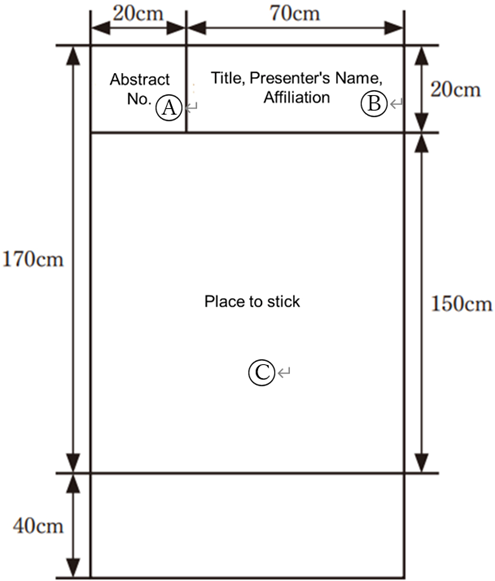
- The poster panel size is W90cm x H210cm and the area where the poster can be placed is W90 cm x H150cm ©. Please prepare your poster to fit in this size.
- The secretariat will prepare Abstract No. (20cm x 20cm) Ⓐ, but each presenter is responsible for preparing a slip of W70 cm x H20cm, with presentation title, name(s) of author(s), and affiliation(s). Ⓑ
- Pins to attach to the poster will be provided by the secretariat in front of the poster panels.
- Please bring your own presentation materials.
- The secretariat will dispose of any posters left on the poster board after the conference.
- Please indicate the ethical considerations and COI (Conflict of Interest) disclosure at the bottom of your poster.
To presenters of poster presentations
Presenters are requested to be in front of their posters 10 minutes prior to the start of the session. The time allocation is 10 minutes (7 minutes for presentation and 3 minutes for discussion (Q&A)). The chair will lead the session.