| |
Official Application “JCS Abstracts” |
|
 |
|
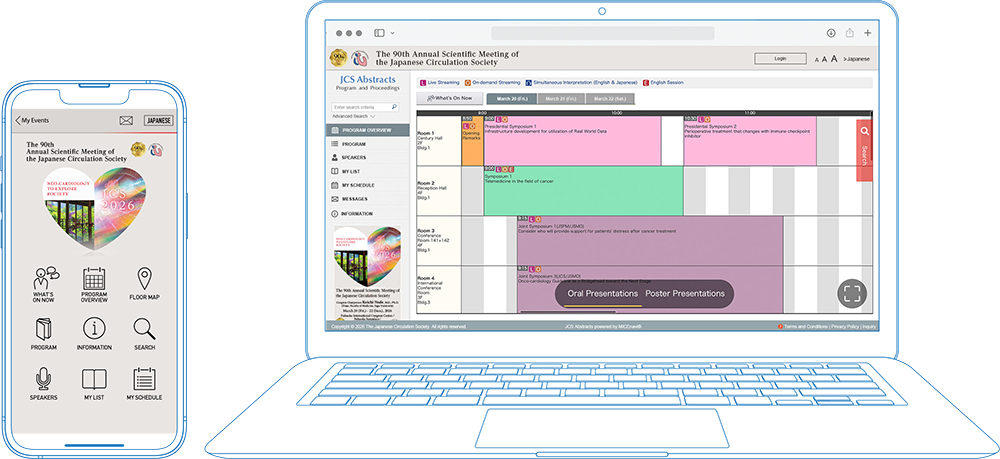
The 90th Annual Scientific Meeting of the Japanese Circulation Society (JCS) offers "JCS Abstracts," an official app for searching abstracts and managing your schedule.
It is available in two formats: a Web version for PC access and a Mobile App version for smartphones. You can include the sessions you wish to attend and any abstracts that interest you. |
|
|
|
|
|
|
| |
|
|
Abstract Browsing Password |
|
|
|
|
|
|
A password is required to browse the abstracts.
You can find the password on page 66 of the Program Book or on your My Page after completing your registration. |
|
|
|
|
|
| The Web version is also available for PC. Please click the button below to access the site. |
|
| Note: An internet connection is required. |
|
| Recommendation: We recommend creating a "JCS Abstracts" account when you first log in. This allows you to sync your bookmarks and browsing history between the Web and Mobile App versions. |
|
|
|
|
|
|
|
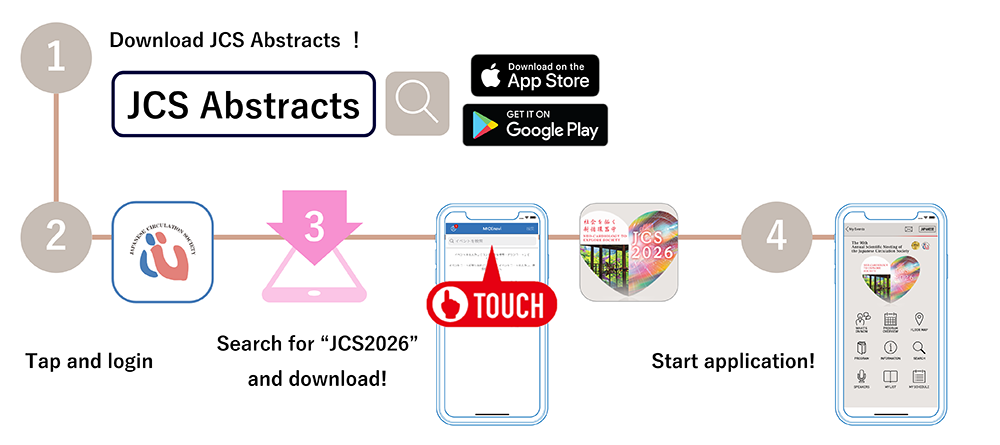
| Step 1. Download “JCS Abstracts” App from Apple App Store / Google Play |
|
| Go to the Apple App Store / Google Play Store on your mobile device. Type “JCS Abstracts” into the search bar and “JCS Abstracts” icon will appear. Please download and install the JCS Abstracts app onto your device. |
|
| Step 2. Find the “JCS2026” in JCS Abstracts |
|
| Search for our congress app by typing “JCS2026” into the search bar. You will see an event come up with our JCS2026 logo. Tap on JCS2026 and download. |
|
|
 |
| |
|
|
| * |
The app is free to use (data communication fees for downloading are the user's responsibility). |
|
|
| Compatibility |
For iOS version 14.0 and above
For Android version 7.0 and above |
|
|
|
|
|
|
| ■ |
Program Details and Abstract Password |
|
| |
Congress Secretariat: c/o Congrès Inc., Kyushu Branch
E-mail: jcs2026@congre.co.jp |
| |
|
| ■ |
"JCS Abstracts" App (Download and Technical Support) |
|
| |
MICE One Corporation
E-mail:micenavi-inq+jcs2026@mice-one.co.jp
(Open on weekdays from 10:00 to 17:30) |
| |
|
|
|
|